16-Button Wireless MMO Mouse: 24000 DPI RGB Control
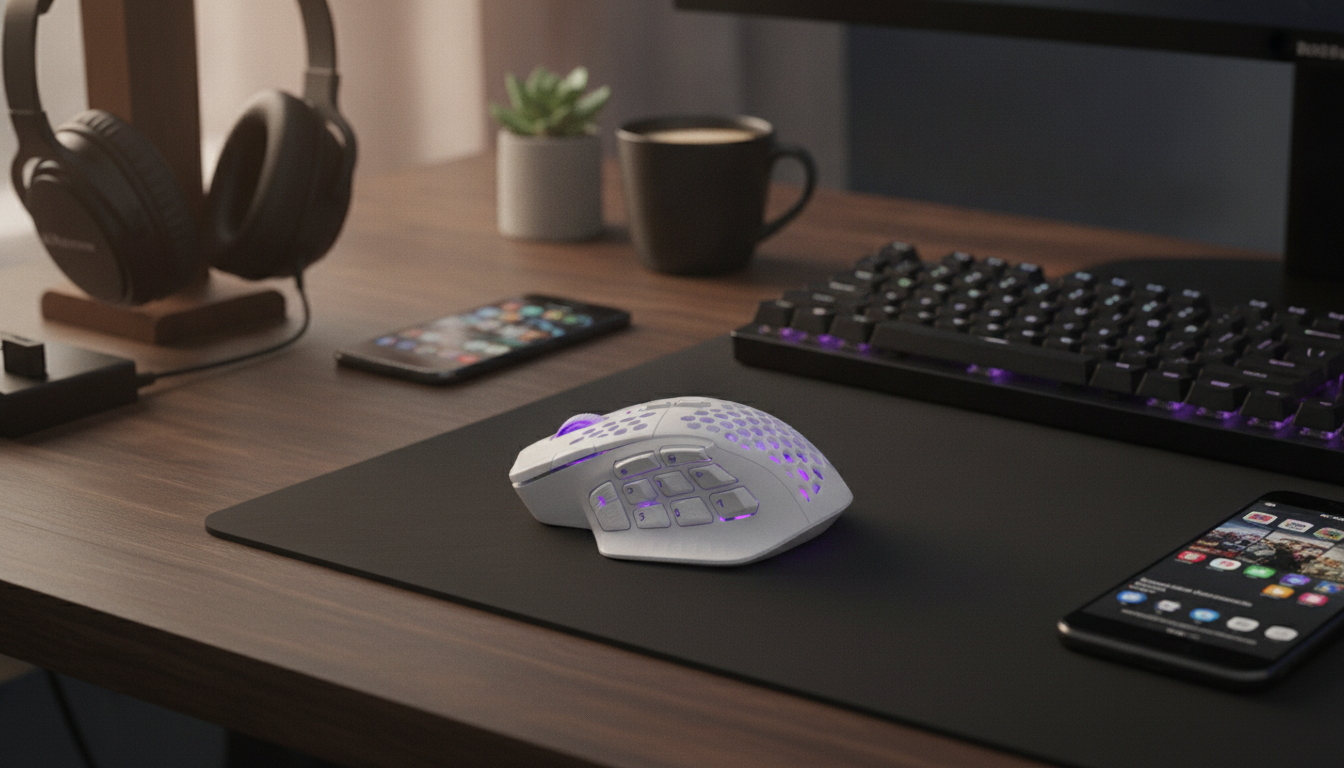
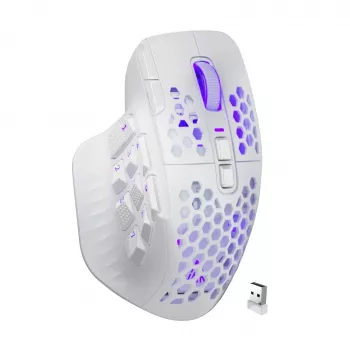
Wireless MMO Gaming Mouse with 16 Buttons & 24000 DPI RGB: Built for Hotbars, Macros, and Long Sessions
A wireless MMO mouse lives or dies by three things: dependable connectivity, enough programmable buttons to reduce keyboard reach, and a sensor that stays consistent through fast flicks and long raid nights. This model pairs a 16-button layout with a high-DPI sensor and customizable RGB, aiming to cover both MMO hotbar management and everyday gaming comfort. If your gameplay revolves around rotations, cooldown timing, and frequent utility actions, a button-dense mouse can make your setup feel cleaner and your reactions more repeatable.
What Stands Out for MMO Play
MMOs, MOBAs, and ARPGs reward efficient input more than raw clicks-per-second. A 16-button layout helps keep your left hand focused on movement and modifiers while your right thumb handles abilities and non-combat actions.
- 16-button layout supports quick access to skills, items, macros, and push-to-talk without shifting hand position.
- Wireless freedom helps keep desk space clean and reduces cable drag during long sessions.
- High DPI ceiling allows tuning for different games and multi-monitor setups.
- RGB lighting offers visibility and personalization, useful for profiles or quick identification.
- Built for repetitive inputs common in MMOs, MOBAs, and ARPGs.
Quick Specs and Feature Checklist
For players who rely on thumb-accessible commands, the best features are the ones that stay consistent: predictable button placement, stable wireless behavior, and DPI steps that don’t feel “jumpy” mid-fight.
- Best for: MMO hotbars, ability-heavy games, and players who want many thumb-accessible controls.
- Core controls: multiple side buttons plus standard mouse buttons for layered binds.
- Sensor tuning: adjustable DPI up to 24000 for fine or fast cursor movement.
- Lighting: RGB zones for personalization and easy profile cues.
- Use cases beyond MMO: productivity shortcuts (copy/paste, media, app switching) and streaming controls.
At-a-Glance Overview
| Feature | What to look for | What this mouse offers |
|---|---|---|
| Buttons | Enough inputs for abilities and modifiers | 16 total buttons for expanded bindings |
| DPI range | Adjustable steps for different games | Up to 24000 DPI (tunable) |
| Wireless use | Stable connection and freedom of movement | Wireless design for uncluttered play |
| RGB lighting | Custom colors/profiles | RGB customization |
| Fit and routine | Comfort over long sessions | Designed for extended gaming sessions |
Buttons, Binds, and Practical MMO Layouts
The fastest way to enjoy a 16-button mouse is to treat it like a “mini hotbar” under your thumb. Instead of copying someone else’s numbering scheme, map buttons according to reach and certainty—what you can press confidently without looking.
- Map core rotation skills to the most reachable thumb buttons; place cooldowns and utilities on the outer row.
- Use modifier keys (Shift/Ctrl/Alt) on one button to multiply available binds without moving off WASD.
- Create profiles per game or class: separate layouts for healer, tank, DPS, or different characters.
- Assign non-combat shortcuts: mount, interact, inventory, map, and push-to-talk for smoother gameplay.
- Avoid misclicks by spacing high-risk actions (e.g., major cooldowns) away from frequently spammed buttons.
A practical pattern is to put “spam” abilities where your thumb naturally rests, then reserve edge buttons for rare but important actions like battle rez, trinkets, or raid markers. Consistency matters more than complexity—once your brain trusts the layout, you’ll stop thinking about inputs and start focusing on mechanics.
DPI and Sensitivity: Getting a Stable Feel
A 24000 DPI ceiling is best viewed as headroom. Most players settle far below that for gaming, but the larger range can help when switching between different titles, multiple monitors, or higher-resolution displays.
- Use lower DPI with higher in-game sensitivity for controlled aiming; use higher DPI for faster desktop movement—then fine-tune.
- Set at least two DPI stages: one for combat/aiming and one for menus or rapid camera turns.
- Keep Windows pointer speed at a consistent baseline and disable pointer acceleration if aiming consistency is a priority.
- Test on the same mousepad surface used daily; texture and friction change perceived sensitivity.
- Re-check settings after switching monitors, resolution, or changing chair/desk height.
For Windows settings guidance, see Logitech Support: Disable mouse acceleration in Windows and Microsoft Support: Change mouse settings.
Wireless Performance and Battery Habits
Wireless feels best when it’s boring—no hiccups, no stutters, no sudden low-battery warnings right before a pull. Small placement and routine tweaks can keep performance steady.
Comfort, Grip Styles, and Long-Session Control
Setup Steps for a Clean, Reliable Configuration
Current Listing
- Wireless MMO Gaming Mouse with 16 Buttons & 24000 DPI RGB — $63.51 (USD), in stock
- Magnetic 15W Wireless Car Charger & Phone Mount for iPhone 16–13 — $34.01 (USD), in stock
- Magnetic Clear Shockproof Case for iPhone 17 Pro & Pro Max — $10.97 (USD), in stock
FAQ
How should the 16 buttons be mapped for MMO raids and dungeons?
Group your most-used rotation skills on the easiest-to-reach thumb buttons, then place defensives and interrupts on distinct, easy-to-identify positions. Use one button as a modifier (Shift/Ctrl/Alt) to expand binds, and keep separate profiles for roles (healer/tank/DPS) to maintain consistency and reduce accidental presses.
Is 24000 DPI necessary for MMO gaming?
No—most players use a much lower effective DPI for gameplay, but a high ceiling gives flexibility for different screens, resolutions, and preferences. Pick a comfortable DPI that feels stable, then fine-tune with in-game sensitivity rather than chasing the biggest number.
Will RGB lighting reduce battery life on a wireless mouse?
Yes, lighting can reduce runtime, especially brighter or animated effects. For longer sessions, use a dim static color or turn lighting off and stick to a simple charging routine before long raid nights.







Leave a comment